
“Claude is busy right now” means Claude has no room for your request at this moment because demand is high across everyone using it, not that anything is wrong with your account. When the message ends in “Retrying automatically…”, the app is already resending your request, so the best move is to wait a minute rather than refresh. If it keeps coming back, switch to another model: Anthropic’s own documentation says capacity is tracked per model, so a quieter one often gets through. It isn’t your usage limit either, which always comes with a reset time. To tell a busy spell from a real outage, check Claude’s status page. Busy spells never appear there, but outages do, and when I went through every incident on it from August to November 2026, half of the ones that hit claude.ai were fixed within 41 minutes.
I’m writing this one because, in my own Search Console data, the versions of this message are among the Claude errors people paste into Google most often, usually mid-task and worried that their account is the problem. It isn’t. Below is what each version means, how to tell busy from down, what the status page’s own history says about how long outages last, and the few things that actually help.
What “Claude Is Busy Right Now” Means
It means Claude is full for the moment and your request is waiting for a free slot. Anthropic’s help center calls this a capacity constraint: “Capacity issues occur when Claude’s infrastructure experiences high demand system-wide.” Nothing is broken. The system is working, it’s just at capacity.
The wording changes with where you see it and what the app is doing about it:
- “Claude is busy right now. Retrying automatically…” The app is resending your request in the background. Leave the tab alone for a minute, because a refresh only starts it over.
- “Claude is busy right now. Try again in a moment.” Same cause, but the app has stopped retrying, so the next attempt is up to you.
- “Due to unexpected capacity constraints, Claude is unable to respond to your message. Please try again soon.” The version Anthropic’s help center quotes word for word.
- “Opus is experiencing high load. Switch to Sonnet.” What the Claude desktop app shows in its Code tab and in Cowork, and it names the way out. On Fable models it names Fable.
- “API Error: Repeated 529 Overloaded errors.” Claude Code’s version, shown only after it has already retried several times.
That’s one situation in five sets of words. None of them points at your account, your prompt or your browser, so there’s nothing on your side to fix.
Busy or Down? The Difference Decides What You Do
Busy and down look alike on screen, but they’re different problems, and Claude’s status page is how you tell them apart. Think of a restaurant. Busy is every table taken: the kitchen works fine and you wait for a seat. Down is a broken kitchen: nobody gets served until it’s fixed, however long you wait at the door.
Anthropic draws the same line. Capacity constraints “are not outages. The system is functioning normally but managing high demand across all users,” and they “will not appear on our status page because they represent normal load management rather than technical problems.” Outages, which Anthropic calls service incidents, are what the status page is for.
So the check takes ten seconds. Open Claude’s status page. If it’s all green and you’re seeing the busy message, you’re in a capacity spell: wait a few minutes or switch models. If an incident is listed for claude.ai, waiting is the whole fix, and its updates tell you how far along the fix is. If what you see is a connection error rather than Claude’s own message, the problem is more likely your network, and our guide to Claude not working covers that side.
When I opened it on 9 November 2026 to write this, it read “All Systems Operational”, with claude.ai at 99.71% uptime over the past 90 days. The red and amber days in its bars are days with incidents, the kind I count in the next section.
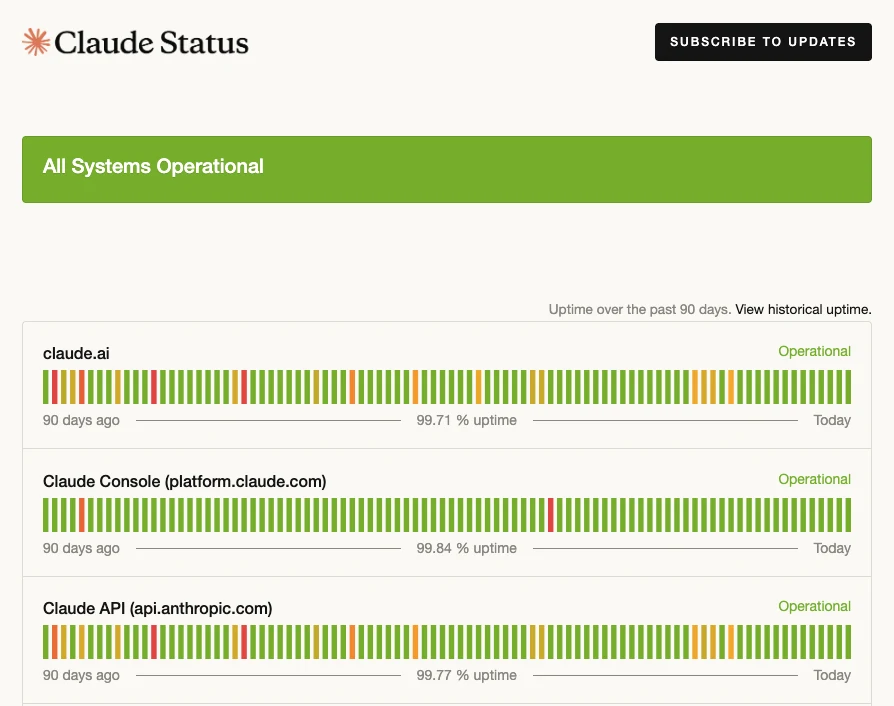
Claude’s status page on 9 November 2026: all systems operational, with claude.ai at 99.71% uptime over 90 days. Busy spells never show here, only incidents do.
How Long It Lasts: What 50 Incidents on Claude’s Status Page Show
Most outages are over within the hour. I checked by going through every incident on Claude’s public status page from 5 August to 8 November 2026, using the page’s own incident history. There were 50, about one every two days, and 38 of them hit claude.ai, the app most people use.
- Half were fixed within 41 minutes. That’s the median for the 38 that hit claude.ai. Twenty-two were over within an hour and 31 within two hours.
- Long ones were rare. Only 2 lasted more than four hours, and the longest ran 4 hours 17 minutes.
- They cluster in the US working day. 33 of the 38 started on a weekday, and 24 between 6am and 6pm US Eastern time. Weekends had 5.
- Many were about specific models. 20 of the 38 named one or more models in their title, such as “Elevated errors for Claude Sonnet 5.5”, which is why switching models so often gets you through.
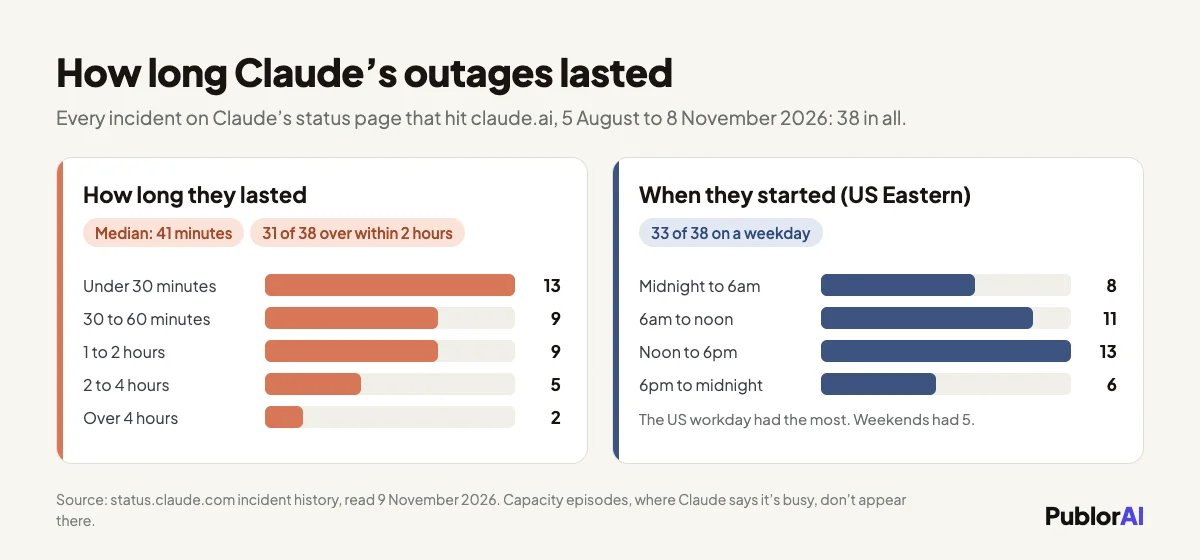
Claude’s status page history, read on 9 November 2026: the 38 incidents that hit claude.ai since 5 August, by how long they lasted and when they started.
One limit on these numbers: they count outages, not busy spells, because busy spells never reach the status page. So they can’t tell you how often you’ll see “Claude is busy right now.” What they do show is how long the worse case, a real incident, tends to last, and that the US working day is when trouble is most likely.
What Actually Helps When Claude Is Busy
Waiting and switching models help, while refreshing and clearing your cache don’t. Four things are worth doing, roughly in this order:
- Give the retry a minute. If the message says it’s retrying automatically, let it. Your request is still in line, and a refresh or a resend only starts it over.
- Switch models. Open the model menu and pick another one, Sonnet instead of Opus for example. Anthropic’s Claude Code documentation says capacity is tracked per model, and the status page history shows incidents often hitting only one model or a few, so a different model is often free when yours is full.
- Check the status page once. Green means a busy spell, so try again in a few minutes, which is Anthropic’s own advice. A listed incident means wait it out, and going by the history above, it’s probably over within the hour.
- Move heavy work away from the US afternoon. If it keeps happening at the same time of day, that’s the demand curve. Anthropic says capacity issues “typically resolve as demand patterns shift throughout the day”, and the outage history leans the same way.
What doesn’t help: clearing your cache, reinstalling the app, switching browsers or turning off your VPN. Those fix problems on your side, and a busy message isn’t one. Hammering the retry button gains you nothing either.
What People Get Wrong About This Message
Most mistakes come from treating a busy message as a problem on your side. These four come up most:
“It’s my usage limit.” It isn’t. A usage limit tells you when it resets, and the busy message doesn’t. Anthropic’s Claude Code documentation is explicit about its own version: a 529 “is not your usage limit and doesn’t count against your quota.” How the real limits work is in our breakdown of Claude’s usage limits.
“My account has been flagged.” No. The message is about demand across all users, not about you. A safety flag looks completely different: Claude switches the chat to another model and says so in a bar under the reply, which we explain separately.
“Paying more makes it go away.” Partly. Claude’s pricing page lists “Priority access at high traffic times” for the Max and Ultra plans, but not for Free or Pro. Priority means being served sooner when it’s crowded, not never seeing the message, and no plan is spared a real outage. If you’re weighing an upgrade anyway, our Claude usage calculator shows whether Max pays off for how you use Claude.
“A green status page means the problem is on my end.” Not with this message. Busy spells are left off the status page on purpose, so green plus “Claude is busy right now” means crowded, not broken.
Claude Code and the Desktop App Say It Differently
In Claude Code, the same capacity problem shows up as “API Error: Repeated 529 Overloaded errors,” and only after Claude Code has already retried several times. Its documentation gives the same advice in command form: run /model to switch models, since capacity is tracked per model, and try again in a few minutes. For unattended jobs it documents a setting, CLAUDE_CODE_RETRY_WATCHDOG=1, that keeps retrying 429 and 529 capacity errors indefinitely instead of giving up after a set number of attempts. In the desktop app’s Code tab and in Cowork, the message is “Opus is experiencing high load. Switch to Sonnet.” and you switch with the app’s model picker. Every message is listed in Anthropic’s Claude Code error reference, and the claude.ai wordings are decoded in our guide to Claude’s error messages.
The Short Version
“Claude is busy right now” is a queue, not a fault. Give the automatic retry a minute, switch models if it keeps happening, and glance at the status page to rule out an outage. If there is one, the history says it’s probably over within the hour. Nothing on your end needs fixing, and it isn’t your usage limit.